Clothing product page checklist: what to show before checkout
Use this clothing product page checklist to improve photos, fit details, size choices, shipping information and the buying experience on mobile.
An online store made for your clothing brand: your own admin, checkout and fashion features built in.
Get started for freeGet a free homepage previewA useful clothing product page checklist covers the questions a buyer needs answered before paying: what the item looks like, how it fits, which options are available, what it costs and what happens after ordering. Put those answers on the page in language someone can understand on a phone.
If customers keep sending “fabric?”, “length?” or “when will it arrive?” in Instagram DMs, you already have a starting point. Turn those repeated questions into product information. Keep personal advice available for people who need it, but don't make every customer start a conversation to learn the basics.
This guide is for small Indian clothing brands preparing their first store or improving an existing one. The examples are illustrative, not results from a client project.
Start with this clothing product page checklist
Open one product on your phone and work through the table. A missing detail isn't a reason to redesign the entire store. Fix the unanswered questions first, then test whether the page is easier to use.
| Buyer question | Information to show | Quick check |
|---|---|---|
| What am I buying? | Specific product name and accurate photos | Can someone identify the item without opening Instagram? |
| What does it feel like? | Verified fabric composition, texture and construction notes | Have you described the actual stock? |
| Will it fit? | Relevant measurements, measuring instructions and fit notes | Is the size guide beside the size choices? |
| Is my option available? | Sizes, colours and current availability | Is the selected combination obvious? |
| What will I pay? | Product price and clear information about extra charges | Are known delivery or COD charges explained before payment? |
| When will I receive it? | Dispatch information and an honest delivery estimate | Have you separated making, dispatch and transit time? |
| What if it doesn't suit me? | A readable exchange or return policy | Can a buyer find the terms before ordering? |
Give each product one clear page. Don't publish separate near-identical descriptions just to repeat search phrases. If two items differ in material or fit, explain those differences where someone is choosing between them.
Show the garment, not just the campaign
A beautiful campaign photo can introduce the mood of your brand, but the buyer also needs to inspect the clothing. Include views that answer practical questions: the front, back, fabric texture, fastening and any distinctive print or embroidery.
For an overshirt, show it closed and open if that helps explain how it is worn. For a printed tee, include a close view of the print and an unobstructed view of the full garment. Choose images because they add information, rather than uploading several almost identical poses.
Keep lighting and colour treatment consistent. Heavy filters can make a cream shirt look white or hide the texture of a dark fabric. Explain meaningful colour differences in words, and check the gallery on more than one screen before launch.
Where possible, photograph the actual product being sold. A concept image may help you plan a shoot, but it isn't proof of the fabric, construction or fit a customer will receive. Don't use AI-generated models as evidence of a real person's measurements or experience.
If you submit products to Google Merchant Center, follow its separate product image requirements. Google expects images to represent the product accurately. A promotional blog cover and a product listing image serve different purposes.
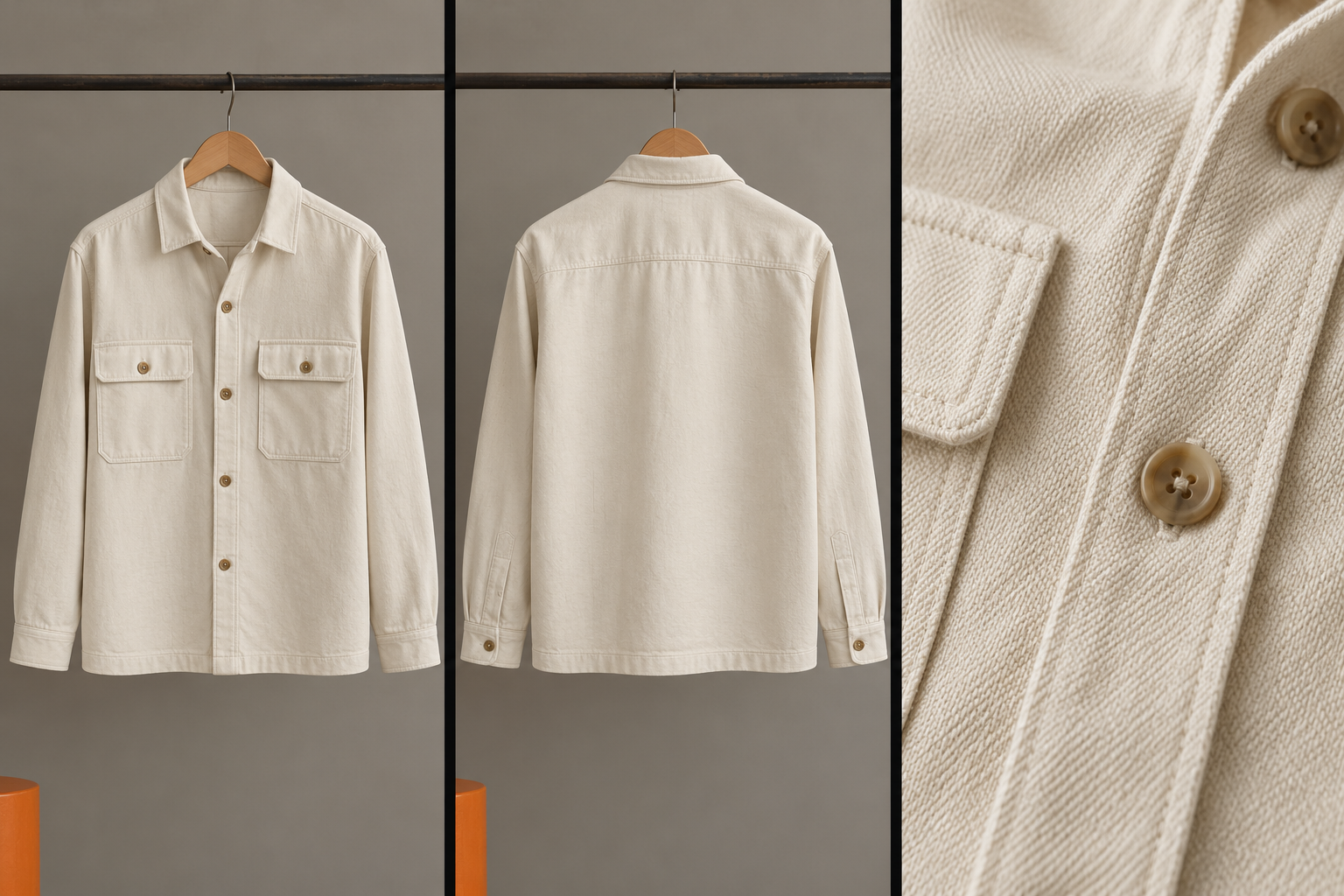
Illustrative editorial image showing three useful garment views; not a photograph of a product offered for sale.
Write details that help someone choose
Replace vague descriptions such as “premium quality, perfect for every occasion” with details you can verify. Fabric composition, lining, pockets, closures, cut and care instructions give a buyer something to work with.
Here is a sample structure for an imaginary overshirt. Use it as a writing template, not as specifications to copy onto your own products:
Fit: Relaxed through the body, designed to wear over a T-shirt. Compare the garment measurements with an overshirt you already own.
Details: Button front, two chest pockets and a straight hem. Confirm these features against your actual garment before publishing.
Fabric and care: Add the verified fibre composition and tested care instructions for this product.
Don't guess a fabric weight or claim that an item won't shrink without supporting information. If you don't have a specification, get it from your maker and check it against the finished stock.
Keep the first paragraph focused on the item. Put longer styling suggestions after the information needed to decide. A customer comparing two shirts shouldn't have to read a brand manifesto to discover that one has a lining and the other doesn't.
Use specific names too. “Relaxed cotton overshirt, sand” communicates more than “The Weekend Essential.” You can keep the creative name and add the useful description alongside it.
Make sizes and colours easy to select
Show the available sizes clearly and make the selected size easy to distinguish. An out-of-stock size should look different from an available one, and the page should explain what happens if someone tries to buy an unavailable combination.
When a customer changes colour, update the relevant photographs and availability where your store supports it. Use colour names as well as swatches: a small circle alone may be difficult to interpret or use.
Place the size-guide link near the size options. Baymard's apparel usability research identifies clear sizing information and visible size choices as important parts of the buying experience.
A size label is only the beginning. Include measurements relevant to that product, state whether they describe the body or the garment, and explain how to compare them. Our guide to making a size chart for your clothing brand walks through that process.
For a set, explain whether the customer chooses one size for the whole outfit or separate sizes for each piece. For adjustable or elasticated products, describe how the adjustment works instead of relying on “free size” alone.
Explain shipping and exchanges before payment
A buyer planning an outfit for an event needs more than “fast delivery.” Separate the time you need to prepare an order from the courier's estimated transit time. If an item is made to order, say so before the customer pays.
Avoid promising a delivery date you can't support. Location, courier availability and operational delays can affect delivery. If your estimate depends on the destination PIN code, explain where the buyer can check it.
Make charges understandable. If delivery is calculated at checkout, state that. If a COD fee applies, explain it before payment. Don't use a “free shipping” banner that conflicts with the charge shown later.
Keep the exchange or return policy accessible from the product page. Explain your actual process, timing, item-condition requirements and any relevant charges in plain language. Have the policy checked for your business obligations rather than copying another brand's terms.
For custom embroidery or personalised products, make the buying conditions clear before ordering. If a buyer must approve a design, explain that step and how it affects preparation time. The page and your support replies should describe the same process.
Test the whole page on a phone
Don't stop after checking the desktop preview. Open the store on a real phone, follow a product link from Instagram and try to choose a colour and size. Read the information before you move to checkout.
Check the page with a slower connection as well. Large images, video and popups can make the first interaction awkward. Use appropriately sized images and confirm that important product details remain readable while media loads.
Run this short test with someone who hasn't helped build the store:
- Ask them to find a specific colour and size without guidance.
- Ask what the garment is made from and how it is intended to fit.
- Ask where they would check dispatch information and exchange terms.
- Have them add the item to the bag and confirm that the selected variant is correct.
- Note every point where they pause, guess or ask you a question.
Use a test order or your payment provider's supported testing process when checking payment behaviour. Don't treat an item appearing in the bag as proof that payment, stock and order handling all work correctly.
At Wraperers, we build phone-first online stores for clothing brands with product pages, sizes, colours, a bag and checkout. Owners can manage products, prices and stock from the admin panel. Our services page explains the wider store offering.
Fix one source of confusion at a time
Start with the product that gets the most repeated questions or is important to your next drop. Add missing information, check it against the stock, and record what you changed. Keep the same details in saved Instagram and WhatsApp replies.
Then watch the questions customers ask. If people still ask whether a shirt is see-through, another lifestyle photo probably won't answer them. An accurate fabric description and a suitable real product photograph may be more useful.
If your analytics are available, compare the same product over a sensible period and record the number of visits and orders. Changes in traffic sources, discounts or stock can affect results, so don't attribute every movement to a new description.
You don't need to wait for a large redesign to start. Choose one page, answer its missing questions, and ask a fresh reader to try it again.
Want a store that presents your clothing clearly? Get a free homepage preview using your products.
Frequently asked questions
How many photos should a clothing product page have?
Should I write a unique description for every colour?
Can I launch without customer reviews?
Will a better product page guarantee more orders?
Want a store like this for your brand?
Send us your brand and we'll design your homepage for free. You only pay if you love it.
Keep reading
How to make a size chart for your clothing brand
Make a size chart for your clothing brand with clear measurements, an example T-shirt table, fit notes and a practical product-page checklist.
Affordable ecommerce website builders in India: 10 options, plus Wraperers
Compare affordable ecommerce website builders in India on billing, fees and setup work: 10 alternatives plus Wraperers for small clothing brands.
Clothing checkout testing: a practical guide before going live
Plan clothing checkout testing for sizes, stock, charges, payment outcomes and order records, using a repeatable checklist before your store goes live.